Charging
You can charge the power station with the mains cable, from a car outlet with the supplied car socket plug to XT60 cable or via solar with optional solar panels.
And EcoFlow sells their Smart Generator that runs on petrol. This can be controlled by the smartphone app and will automatically turn on to charge the Delta 2 when the battery is low. You could of course use any petrol generator to do this manually.
The USB-C ports are only for output and you’re unable to charge via these ports unfortunately, like you can on the Allpowers unit I looked at.
One of the most impressive features of the Delta 2 is the charging speed. The Anker 757 I reviewed could charge its 1229Wh battery at 1000W with just the mains lead – no massive AC adapter. The Delta 2 has upped the ante and can charge at a whopping 1200W, again just using a standard IEC mains cable – often called a kettle lead in the UK. There is a velcro tie on the cable with a warning that you should only charge the unit with this cable. Any 10A mains cable should be ok, but you’ll immediately blow the fuse with anything less than 10A so make sure you check the rating.

EcoFlow claims the unit can charge its 1024Wh battery from completely flat to 80% in 50 minutes with a full charge taking 80 minutes. In my tests it reached almost 50% charge in 30 minutes from completely flat, 80% charge in just under 50 minutes and 100% charge in just under 80 minutes – pretty much exactly confirming EcoFlow’s claims and is very impressive. It does get very noisy charging at these high speeds.
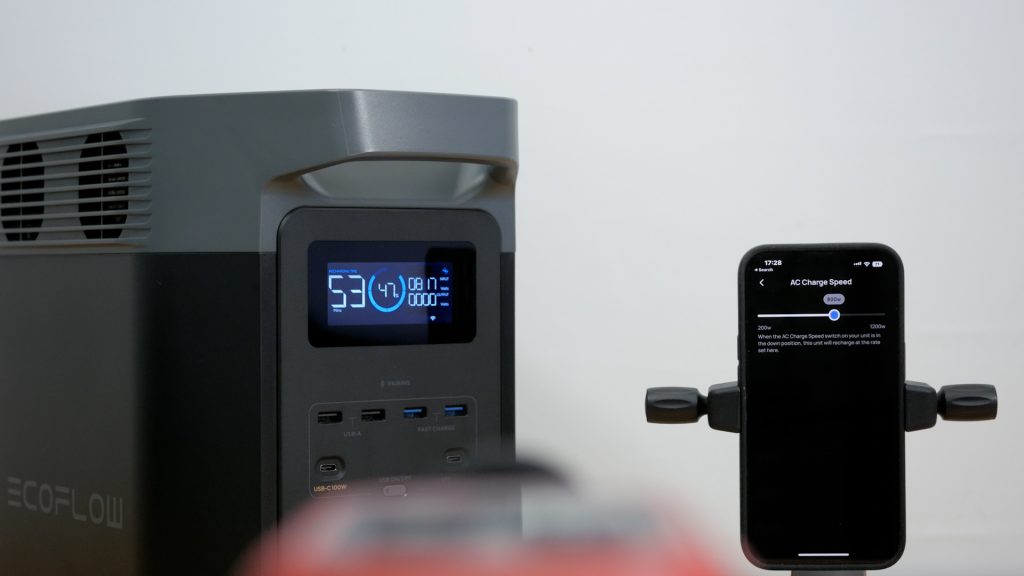
With a sound level meter 1 metre from the unit I measured 58 dB with all the fans running at full speed. That was around 20 dB louder than background noise in my office. Fortunately you can use the excellent accompanying EcoFlow app to set the maximum charging speed. I found dropping this to a still pretty rapid 800W dropped the measurement by 10 dB. A drop of 10 dB equates roughly to a halving of the perceived noise, so a very noticeable reduction. And in general use when you don’t always need the super fast charging it’s probably a little better for the battery’s longevity. There only seems to be two fan speeds – even dropping the unit all the way down to 200W charging the noise levels are the same. I imagine it would be possible to have the fan speed vary more smoothly with charging speed with a firmware update and perhaps turn off completely at low charging speeds. You can hear how the Delta 2 sounds at full charging speed and at 200-800W charging speed in the accompanying video.

I did check the Delta 2’s temperatures when fast charging with a Flir thermal imaging camera and the design of the unit and the fans did a good job of keeping it cool as you can see.
The 2 colour 8cm LCD display on the Delta 2 is bright and clear, and shows information on remaining charge time when it’s charging and remaining run time when it’s powering your devices. This estimate is adjusted in real time depending on input or output power. There’s also the battery capacity displayed graphically and as a percentage and icons that illuminate to show which ports are in use. This information is also available in the app which can monitor the power station even away from home on a cellular connection if you connect to the device over WiFi.

There is also an option to connect directly to the power station over Bluetooth when there’s no WiFi – just tap on “use without Internet” when you’re asked to select your WiFi network. I’ve already covered adjusting AC charging speed under Settings in the app, and will mention other relevant options as I proceed through the review. But you can also turn off beeps and I’d recommend making sure the firmware is up to date. The display is very clear indoors but a little harder to see outdoors in bright sunlight.
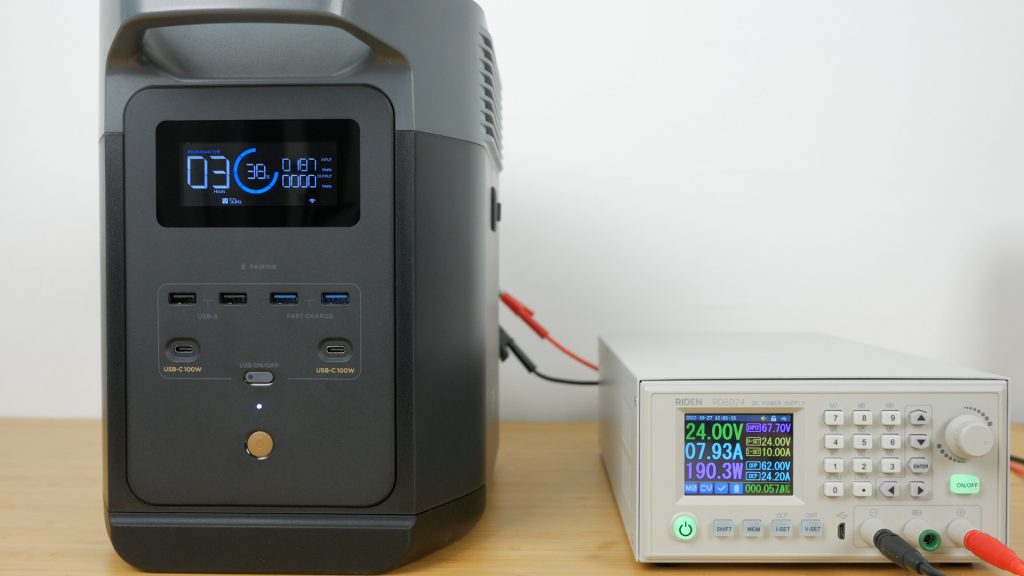
The unit charges at around 100W with the supplied cable via a 12V car outlet. So a full charge would take over 10 hours. You also charge faster if your car has a 24V output, which I confirmed with my bench power supply charging the Delta 2 at 192W. You are limited to 8A as you can see even with the bench supply set at 10A – this is set in the app and can’t be increased, only lowered. I did increase the voltage all the way up to 60V and charged the unit at 480W – still limited to 8A. I tried charging by mains at the same time, but this isn’t possible – it switches across to mains charging. The same applies if you use solar panels via the DC input. So you can’t use the DC and AC input at the same time which is possible on the Bluetti AC200P, but then direct mains charging on this unit is way faster than the Bluetti so it’s not necessary.
The DC input automatically switches between car and solar charging – there’s no manual setting in the app like on the EcoFlow River Max. You should be able to use its full 15A maximum input charging via solar.
And like all the power stations I’ve tested the Delta 2 has a built-in MPPT controller for more efficient solar charging.

I tested solar charging with EcoFlow’s 220W Bifacial solar panel in series with their 160W standard panel. Ideally I’d have two identical panels in series for the highest output but I had only one of their newer 220W panels.
Connecting solar panels in series you add their voltages together, and in parallel you add the current for each panel – the voltage stays the same. Since these panels are around 20V the 11-60V input range provides plenty of headroom for a series connection, which is also easier to setup without any additional adapters.

It’s autumn here in the UK and the weather is already pretty grim, but I did have a brief sunny spell to test solar charging. I had to use the MC4 to XT60 cable that came with the EcoFlow River Max since nothing is provided with the Delta 2 or the 220W panel. Connecting two panels in series is easy – you connect a male and female connector together from each panel, and the remaining connectors to the adapter cable that plugs in the back of the Delta 2.
With the panels directed at the sun I got around 230W which isn’t bad considering it was later in the afternoon and the end of October.
I do find setting up EcoFlow’s panels fiddly compared to other solar panels I’ve used. And the 220W bifacial panel is also pretty heavy at 9.5kg. But it does have a trick up its sleeve.

As its name suggests this panel has solar panels on both sides. The front panel that should face the sun is 220W and the rear panel is 155W. The rear side can use ambient light to increase performance by between 5 and 25%. Ideally you’d have something reflective underneath, not soggy Dartmoor moorland. And with the sun already lower in the sky there wasn’t much ambient light to boost the performance. When the conditions are better I plan to do a group test of all the panels I’ve accumulated, so make sure you’re subscribed if you don’t want to miss it.
You don’t have to use EcoFlow’s panels – you can use whatever you have. And if you don’t need these portable foldable panels, far cheaper options are available. For example two of these 200W Renogy panels off Amazon in series would provide around 400W of output for about the same price as the EcoFlow 220W panel. These have standard MC4 connectors and you then just need the MC4 to XT60 adapter for the Delta 2.
In ideal conditions the Delta 2 can charge at up to 500W with its 11-60V 15A input – so that would be 2-3 hours for a full charge. With my setup, or even just the one 220W panel in better conditions, it’d take approximately 6-7 hours to charge the unit.
https://thetechnologyman.com/